
Definition #
A Tag is an essential piece of metadata for organizing and managing resources in Cloud Computing environments. It is a value pair composed of a key (Name) and a value (Value), which allows you to efficiently categorize and identify cloud resources. For example, you can create a tag with the Name “Department” and the Value “IT” or “Marketing”.
Tags play a fundamental role in infrastructure administration across providers such as AWS, Azure, Google Cloud, Oracle Cloud Infrastructure (OCI), and Huawei Cloud, facilitating tasks such as cost control, resource tracking, and the enforcement of security policies.
Types of Tags #
Cloud8 offers support for two types of Tags:
Native Tag: #
These are tags originating from the cloud providers. Our platform is capable of cataloging all existing tags within the customer’s infrastructure and using them for a wide variety of filters. Native Tags are ideal for automation workloads and business rules that apply exclusively to the service provider.
Synthetic Tags: #
These are tags whose name or value are defined directly within the Cloud8 platform. With Cloud8, it is possible to assign tags and tag values to resources that natively cannot be tagged, allowing you to achieve 100% cost allocation. This occurs because tags in Cloud8 can be used without the need to tag the resources in the cloud provider. Synthetic tags are ideal for showback and chargeback workloads, as well as for cloud cost management.
A synthetic Tag value, on the other hand, is used when the tag already exists, but the resource does not have a tag value assigned to it—either due to a lack of operational definition or due to technical infeasibility in the case of resources that natively cannot be tagged.
Procedure for Adopting Synthetic Tags #
The user can contact Technical Support and request the creation of a synthetic tag to be used exclusively on the Cloud8 platform, and if necessary, it can be propagated via API to the cloud service provider. The email must contain the following information:
- Naming Convention (kebab-case, Camel-Case, UPPERCASE, etc.)
- Period from which the tag needs to be reflected on the platform, which can be retroactive to the date of the request.
- Inform whether the desired tag will actually be synthetic, or a native cloud tag to which the user will assign synthetic values.
Note: In the case of native tags with synthetic values, Cloud8 will overwrite the value of the existing tags within Cloud8. Consequently, the report in the Cost and Usage Report (CUR) will differ from the Cloud8 dashboard.
Naming Conventions and Standards #
The adoption of naming conventions for tags and their values is essential to ensure consistency, reliability, and traceability in resource classification. Without standardization, tags lose their value, as minor spelling or semantic variations can generate data fragmentation and render FinOps, compliance, or security reporting unviable.
Tags are generally case-sensitive, meaning that any variation in spelling generates a new tag or tag value. See the example using the “Environment” tag as a standard:
- Environment: Development – One Tag and one Tag value
- ENVIRONMENT: Development – Different Tag and same Tag value
- Environment: DEVELOPMENT – Same Tag and two Tag values
- ENVIRONMENT: DEVELOPMENT – Different Tags and Values
Recommendations: #
- Consistency: keys and values must be documented and standardized to avoid variations. Example: Application ≠ APPLICATION ≠ application
- Clarity: keys and values must be easily identifiable for all teams.
- Conventions: tags must adopt a uniform format and a standard language. It is recommended to use initial capitalization or CamelCase, without spaces, special characters, or accents.
- Adequate granularity: tags must be audited frequently to ensure full adoption.
- Organizational scope: the naming convention must be applicable across all areas, environments, and cloud providers. A corporate catalog of valid tags must be established.
- Automations: higher levels of maturity will demand the use of scripts, tools, policies, and pipelines to validate the adopted standards.
- In the case of AWS, which requires choosing tags, we strongly suggest marking the tags that AWS itself manages: “aws:createdBy”, “aws:ecs:serviceName”, “aws:ecs:clusterName”, “aws:autoscaling:groupName”, “aws:eks:cluster-name”
Tag Application Procedures #
Layers Complementary to Tag Governance #
Tags are mutable and not supported by all resource types. Therefore, they should be viewed as a complement to native cloud and traditional IT governance structures, rather than a replacement.
Account hierarchies allow you to build a successful cost allocation strategy by making use of the logical groupings below.
Subscriptions / Accounts / Tenants #
Can be used to separate environments, such as production, development, and staging. In the case of Holdings composed of diverse companies, it is recommended that each company have its own subscriptions.
Resource Groups / Projects / Folders #
Create logical groupings that make sense with each company’s internal organization, which may represent environments if there is no separation by Subscription. They can also be used to organize specific resources of certain applications.
Management Groups / Organizations / Hierarchies #
Use to define centralized compliance, cost, and security policies for multiple Subscriptions belonging to a specific Business Unit or Organization.
Naming Conventions #
Resource naming standards that are clear, consistent, and mandatory for all resources.
Hybrid Governance Model #
Considering the complementary governance layers listed above, we can state that the ideal governance model is not the one that adopts tags as its primary tool, but rather the one that makes the ideal combination between:
- Strong and well-planned account hierarchies(RGs, Subscriptions, Management Groups, etc.). The way the infrastructure is organized will form the first strategic layer of cost allocation, making it possible to isolate the costs of environments or applications.
- Clear and consistent Naming Convention, applied to all resources. The organization should be encouraged to have a naming standard and well-defined processes to ensure it is strictly followed.
- Complementary tags, for granularity, financial reporting (FinOps), automation, and specific use cases (auditing, compliance). Tags help pass existing expenses on to their respective owners.
Thus, if a tag is missing, basic categorization by logical grouping still exists; if the resource does not accept tags, it still belongs to a structure that provides context; and if an audit requires traceability, it will be possible to cross-reference all the data above to ensure consistency in the information provided.
Tag Inheritance #
An effective option to ensure that as many resources as possible are tagged is to use tag replication from a parent resource to its child resources, such as in the case of backups and disks attached to a specific server. Some providers, such as Azure, allow tag inheritance at the Resource Group level, ensuring that all resources created within that grouping receive the same tags.
Tagging Policies #
To ensure that mandatory tags are declared on resources to be created, the cloud administrator can create Policies that prevent the creation of new resources without the required tag keys and/or values.
If a user attempts to create a non-compliant resource, a Deny policy will prevent the creation of the new artifact in the environment, notifying the user to adjust the tags before a new deployment attempt.
Tags across Cloud Providers #
- AWS: choose the tags that will be displayed in the Cost And Usage Reports data at https://console.aws.amazon.com/billing/home?region=us-east-1#/preferences/tags
- Azure, Google Cloud, Huawei, and Oracle: will publish all tags that the components possess
- Azure: we process component tags and Resource Group tags. You can choose whether you want to work by tagging all components or only the RGs. Tagging RGs is easier, but requires components to be allocated correctly. Cloud8 displays RG tags with the prefix “azure:rg:”. E.g.: “azure:rg:costcenter”, which will be different from simply “costcenter”
Limitations in Tag Registration #
- Tags do not propagate retroactively. The day and time you mark the tags is the start of accounting by the cloud provider. The ideal approach is to insert them immediately upon creating components and review them before the next accounting period begins (for example, before the turn of the month);
- Different spellings – such as a simple space – are treated as different groupings – hence why we recommend using lowercase and ASCII.
- Not all components support tags. Check with your provider to learn more.
- Note: Cloud8 features a tool to map what is untagged called Untagged.
Tag Sanitization #
Cloud providers, with the exception of AWS (where you must indicate which Tags you want to use as previously documented), bring all Tags into cost reports. If the number of Tags is excessive, it can hinder visualization and productivity.
The first advantage of Tag Sanitization is choosing only the main Tags for FinOps. The second is cleaning up the spelling of Tags to harmonize groups of Tags and fix history.
The principle is simple: choose a ‘main’ Tag name and associate variations with it. This measure helps mitigate Naming Convention issues, though the best solution will always be correcting Tags using the Untagged and Tagged modules.
Example:
Main tag: “product”
Variations:
“Product”
” product” (with a leading space)
“Product”
“client” (any variation being migrated).
Tag sanitization can be done by clicking on Providers. Select one of the providers and click on FinOps Tags:
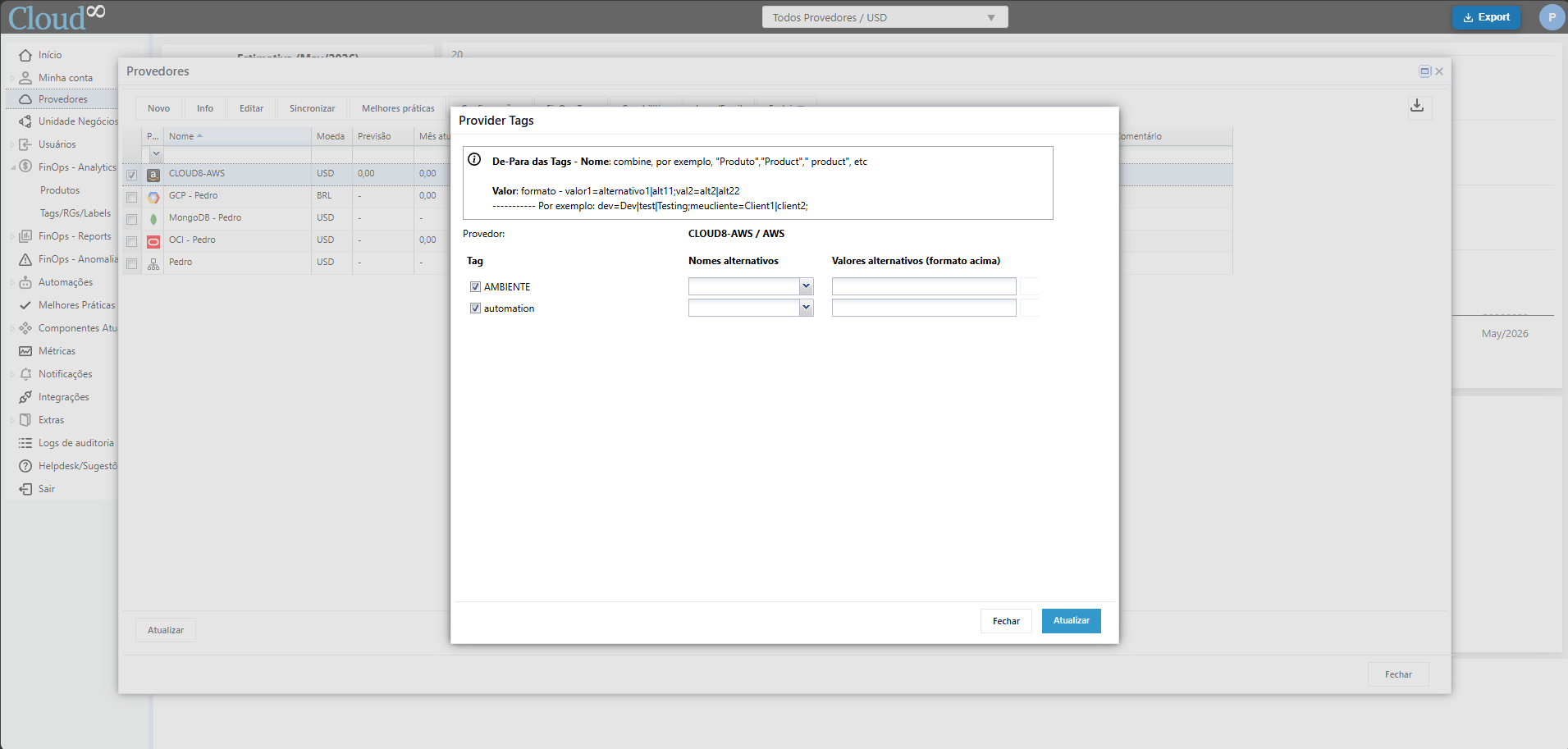
With this feature, it is possible to map alternative names and values, consolidating legacy and/or incorrect spellings. You can enter several alternative values, separating them with commas.
Tags in MultiCloud – Business Units #
As mentioned earlier, it is very important to define Tags in a format that is accepted by all public clouds.
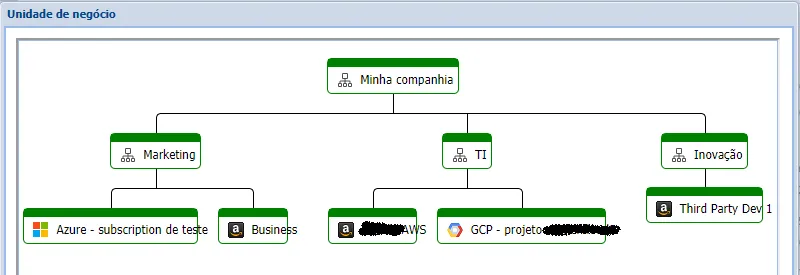
Cloud8 allows the management of Tags in a MultiCloud environment through the ‘Business Units’ feature. By replicating your company / department / client structure, you gain a new ‘provider’ and unlock all cost tracking functionalities—whether technical or business-oriented (Tags).
Tags common to all providers, such as “costcenter”, will have a consolidated report.
If the providers use different currencies, Cloud8 takes care of converting them to Dollars or Brazilian Reais, keeping product costs and Tag costs aligned and compatible.
Compliance in Tag Values. #
To ensure that all components have tags and are following your process definitions, we provide compliance rules within “Best Practices”.
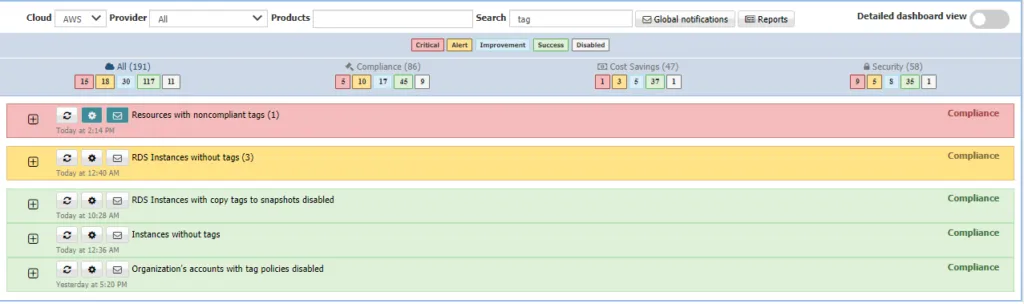
As previously described, tracking and correcting untagged components can be done by applying “Untagged”. But how can you ensure that the values (in addition to the names) entered are also correct?
For example: we define that Tags must be “costcenter”, “products”, “environment”, “team”. How do we ensure that the cost centers used in the Tags are correct and belong to an approved list? E.g.: cc-0101, cc-2341, cc-7788, etc., and that someone doesn’t accidentally input an incorrect value?
Through Best Practices, you can create your compliance policy. Look for the “Resource with noncompliance tags” rule and define names/values within the filters. Remember that values are always case-sensitive, so pay attention to uppercase and lowercase letters.
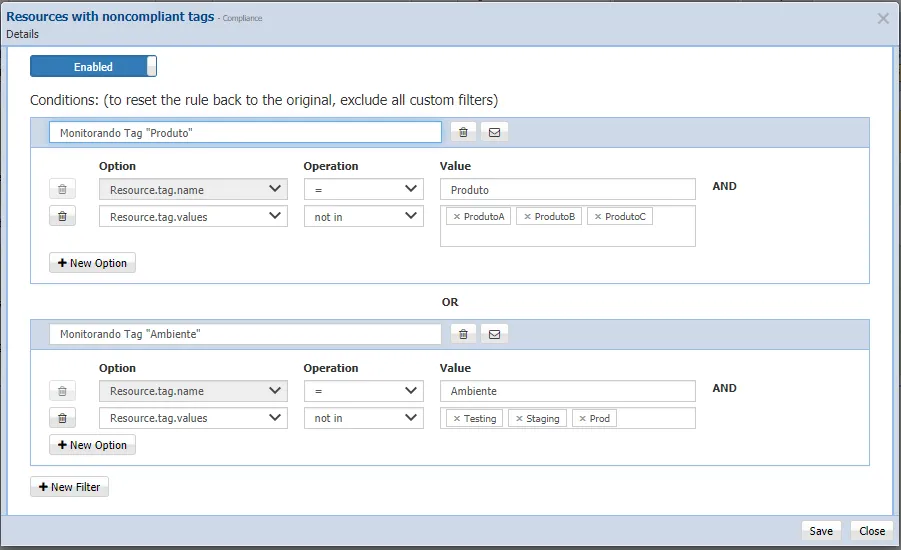
If a value falls outside the defined list, you will be alerted via your chosen notification channel.


