
1 – Objective #
The objective of this Playbook is to present best practices for using tags on IT resources, focusing on governance, cost traceability, security, and compliance. Additionally, a very special objective of this playbook is to serve as a didactic guide on the use of metadata for FinOps.
2 – Scope #
This playbook applies to all types of metadata, although it adopts the nomenclature of “tag”, which may initially allude to the Azure ecosystem. However, the content can also be used in on-premises environments and other clouds such as AWS, GCP, and Huawei.
3 – Benefits of Using Tags #
3.1 – Cost Visibility and Traceability #
Tags allow IT resources to be directly associated with applications, business areas, and cost centers. This makes it possible to identify who is consuming and how much is being consumed. This benefit ensures the proper distribution of costs among their respective owners.
3.2 – Governance and Information Security #
Tags contribute to greater control and visibility over the resource lifecycle. They can be used to reinforce information security, reducing exposure risks and identifying all resources that may have been affected by a cyber attack.
3.3 – Process Automation #
Various automations use tags as triggers, automating tasks such as server Start/Stop, data storage lifecycle, resource monitoring, and scalability. This is a strategy that reduces operational costs and ensures process standardization.
3.4 – Audit and Compliance Support #
Organizations are subject to specific regulations and standards, such as LGPD, ISO, and similar frameworks. Tags provide direct support for classifying auditable or compliance-required resources, also facilitating traceability and consistency in report generation. Examples are listed below:
- Data classification: {Compliance:LGPD}
- Resource criticality: {Compliance:Confidential}
- Adherence status: {Compliance:Auditing}
This type of tag makes audits faster.
3.5 – Resource Organization #
In complex environments, which may span multiple clouds, regions, and projects, applying tags ensures a logical organization structure that goes beyond the native groupings of each provider. This simplifies asset location, categorization, and management, while reducing waste caused by orphaned or duplicate resources.
4 – Naming Conventions and Standards #
Adopting naming conventions for tags and their values is essential to ensure consistency, reliability, and traceability in resource classification. Without standardization, tags lose value, as minor spelling or semantic variations can lead to data fragmentation and undermine FinOps, compliance, or security reports.
Recommendations: #
- Consistency: keys and values must be documented and standardized to avoid variations. Example: Application ≠ APPLICATION ≠ application
- Clarity: keys and values must be easily identifiable for all teams.
- Conventions: tags must adopt a uniform format and a standard language. It is recommended to use initial capitalization or CamelCase, without spaces, special characters, or accents.
- Adequate granularity: tags must be audited frequently to ensure full adoption.
- Organizational scope: the naming convention must be applicable across all areas, environments, and cloud providers. A corporate catalog of valid tags must be established.
- Automations: higher levels of maturity will require the use of scripts, tools, policies, and pipelines to validate adopted standards.
Basic Tag Model #
A best practice is to require tags only for necessary basic metadata, and for this, a recommended standard would use the following tags:
- Environment: differentiate production, development, and staging costs.
- Application: identify the application to which the resources belong.
- Owner: identify the person or team accountable for the resource.
- CostCenter: sector of the organization where costs should be allocated.
- Compliance: identify regulatory requirements, standards, or specific classifications that a given resource must follow.
Note: by adopting a hybrid governance model, we can replace Environment and CostCenter tags with one of the account hierarchy components.
5 – Tag Application Procedures #
5.1 – Layers Complementary to Tag Governance #
Tags are mutable and not supported by all resource types. Therefore, they should be viewed as a complement to native cloud and traditional IT governance structures, rather than a replacement.
Account hierarchies allow for a successful cost allocation strategy by making use of the logical groupings below.
5.1.1 – Subscriptions / Accounts / Tenants
Can be used to separate environments, such as production, development, and staging. In the case of Holdings composed of diverse companies, it is recommended that each company has its own subscriptions.
5.1.2 – Resource Groups / Projects / Folders
Create logical groupings that make sense for each company’s internal organization, which may represent environments if there is no separation by Subscription. They can also be used to organize specific resources of certain applications.
5.1.3 – Management Groups / Organizations / Hierarchies
Use to define centralized compliance, cost, and security policies for multiple Subscriptions belonging to a specific Business Unit or Organization.
5.1.4 – Naming Conventions
Resource naming standards that are clear, consistent, and mandatory for all resources.
5.2 – Hybrid Governance Model #
Considering the complementary governance layers listed above, we can state that the ideal governance model is not the one that adopts tags as its primary tool, but rather the one that makes the ideal combination of:
- Strong and well-planned account hierarchies (RGs, Subscriptions, Management Groups, etc.). The way infrastructure is organized will form the first strategic layer of cost allocation, allowing the isolation of environment or application costs.
- Clear and consistent Naming Convention, applied to all resources. The organization should be encouraged to have a naming standard and well-defined processes to ensure it is strictly followed.
- Complementary tags, for granularity, financial reporting (FinOps), automation, and specific use cases (audit, compliance). Tags help attribute existing expenses to their respective owners.
Thus, if a tag is missing, basic categorization by logical grouping still exists; if the resource does not accept tags, it still belongs to a structure that provides context; and if an audit requires traceability, it will be possible to cross-reference all the data above to ensure consistency in the information provided.
5.3 – Tag Inheritance #
An effective option to ensure that the maximum number of resources is tagged is to use tag replication from a parent resource to its child resources, such as backups and disks attached to a given server. Some providers, such as Azure, allow tag inheritance at the Resource Group level, ensuring that all resources created within that grouping inherit the same tags.
5.4 – Tagging Policies #
To ensure that mandatory tags are declared on resources to be created, the cloud administrator can create Policies that prevent the creation of new resources without mandatory tag keys and/or values.
If a user attempts to create a non-compliant resource, a Deny policy will block the creation of the new artifact in the environment, notifying the user to adjust the tags before a new deployment attempt.
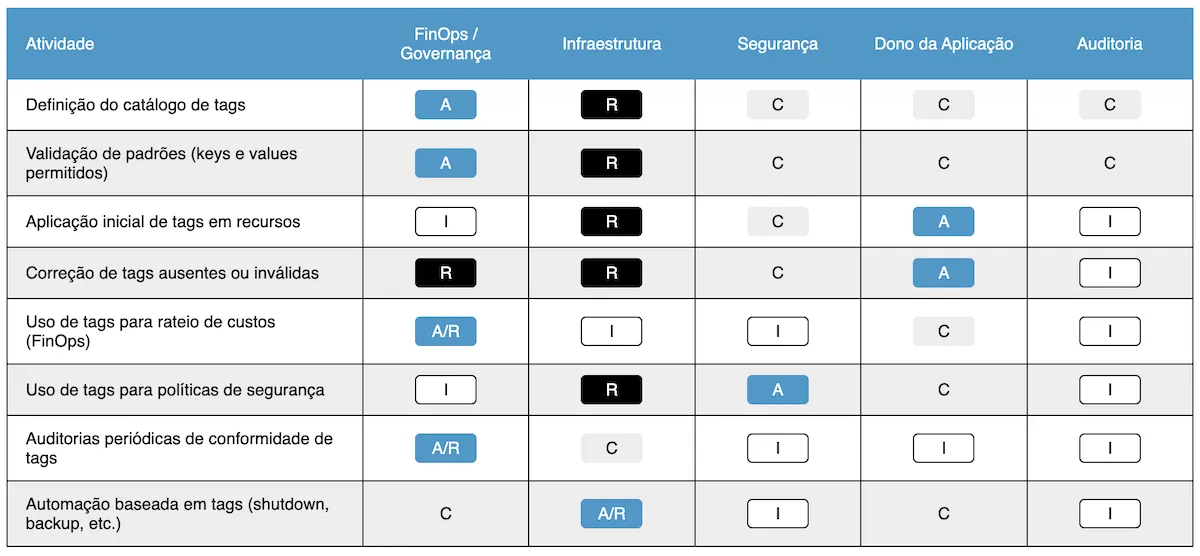
6 – Governance and Responsibilities (RACI) #
7 – Compliance Checklist #
The checklist below should be used periodically by Governance, FinOps, Infrastructure, and Audit teams to ensure that tag usage is consistent, up-to-date, and adherent to defined policies.
7.1 – Structure and Standards #
- An official tag catalog is defined and documented.
- All tags have a standardized Key complying with established conventions.
- Values follow agreed standards (controlled lists, date formats, identifiers).
- The catalog is periodically reviewed to reflect business, governance, and compliance changes.
7.2 – Application and Coverage #
- All critical resources have mandatory tags applied.
- A minimum tagged resource coverage (%) is defined (e.g., 95%).
- Resources that do not support tags are properly mapped and compensated by other strategies (e.g., synthetic tags, naming conventions, logical groupings).
- Newly created resources receive tags at creation time (automation or blocking policy).
7.3 – Governance and Consistency #
- Tags do not have inconsistent values (e.g., “Produção”, “Prod”, “PRD”).
- Critical tags (e.g., Owner, CostCenter, Compliance) are periodically validated.
- There is a process for correcting invalid or missing tags (alerts, automation, runbooks).
- There is clarity on who is responsible for each tag (according to the RACI matrix).
7.4 – Usage and Integration #
- Tags are used for cost allocation (FinOps) reliably.
- Tags are integrated with security policies (e.g., encryption control, critical environments).
- Tags are used in process automation (e.g., automatic shutdown of non-production VMs, backups, scalability).
- Tags are integrated into audit and compliance reports.
7.5 – Audit and Monitoring #
- There are periodic compliance reports for tags (monthly, quarterly).
- Coverage gaps or inconsistencies are monitored and reported.
- Internal or external audits can cross-reference information between tags, hierarchies, and naming conventions.
- There is an action plan to reduce deviations when identified.
- Tags are used to identify resources that must comply with regulatory and compliance standards.
8 – Supporting Tools #
Efficient tag management relies not only on policies and processes, but also on tools that facilitate their application, monitoring, auditing, and automation. Below are examples of tools that can support the process:
8.1 – Native Cloud Tools #
8.1.1 – Azure
- Azure Policy: allows creating rules to enforce or remediate tags on resources and resource groups.
- Azure Cost Management + Power BI: tag-based cost reports.
- Azure Resource Graph: queries to identify untagged resources or resources with invalid tags.
8.1.2 – AWS
- AWS Tag Editor: tool to view and manage tags across multiple services.
- AWS Organizations + Service Control Policies: apply centralized governance policies.
- AWS Cost Explorer / CUR: tag-based financial reports.
8.1.3 – Google Cloud (GCP)
- Resource Manager Labels: equivalent to tags for organizing resources.
- Billing Reports: allows filtering costs by labels.
- Policy Controller: metadata policy validation in clusters.
8.1.4 – Huawei Cloud
- Tag Management Service (TMS): allows creating, managing, and applying tags across multiple services.
- Cost Center: cost reports filtered by tags.
8.2 – Automation and Data Analysis #
- Infra as Code (IaC): Terraform, Bicep, ARM Templates, CloudFormation → allow defining tags during provisioning.
- Scripting & Automation: PowerShell / Azure CLI / AWS CLI allow creating scripts for tag validation and remediation.
- Python (Pandas): billing file analysis to reconstruct missing tags from naming conventions or business rules.
- Monitoring & Alerts: Grafana / Prometheus for creating dashboards showing tag coverage. Azure Monitor / AWS CloudWatch / GCP Operations for generating alerts for non-compliant resources.
9 – Tag Limitations and Governance Complements #
Although tags are an extremely important strategy for classifying and organizing resources, the following must always be taken into account:
9.1 – Not all resources support tags #
Some resources may not allow the use of metadata. Therefore, the user must weigh whether critical criteria for classification or cost allocation should be tied to a specific tag, since in practice not all resources will be able to use them.
Thus, there will be a total amount of untagged spending that will need to be audited through data analysis. To minimize this scenario as much as possible, we can take the following recommendations into account:
9.1.1 – First recommendation: Adopt a tool that allows Synthetic Tags application:
Cost management tools, such as Cloud8, for example, allow the use of Synthetic Tags. This feature enables the platform to manage agnostic tags within its own workload, applying them even to resources that natively cannot be tagged.
This strategy also has the advantage of allowing metadata management from several different service providers in a unified way.
9.1.2 – Second recommendation: Logical Grouping Tags
Some cloud providers allow tagging on logical groupings. Azure, for example, allows applying Tags to Resource Groups.
Thus, an effective strategy to deal with resources that cannot be tagged in environments where groupings failed to adopt Naming Conventions is to apply metadata to them. This makes it possible to mitigate the impacts of non-compliance with the naming standard, as well as to identify costs of resources that do not permit native tagging.
9.1.3 – Data Analysis based on billing files
Using data analysis libraries, such as Pandas (Python), it is possible to create scripts with rules to populate the Tags column using the organization’s own naming conventions and other business rules.
9.2 – Metadata is not immutable #
Tags can be changed manually or removed inadvertently, which can compromise their reliability if proper automation and governance are lacking.
9.3 – Exclusive dependency on Tags creates risk #
If all compliance, security, or cost categorization relies solely on tags, consistency is lost when those tags do not exist or are applied incorrectly.
References #
Storment, J.R.; Fuller, Mike. Cloud Finops: Tomada de decisões colaborativas em tempo real sobre o valor da nuvem. São Paulo: Novatec Editora, 2025.
https://learn.microsoft.com/en-us/azure/azure-resource-manager/management/tag-policies?
https://learn.microsoft.com/en-us/azure/governance/policy/tutorials/govern-tags
https://docs.aws.amazon.com/tag-editor/latest/userguide/tagging.html
https://support.huaweicloud.com/intl/en-us/productdesc-tms/en-us_topic_0071335169.html?
https://cloud.google.com/kubernetes-engine/enterprise/policy-controller/docs/overview
https://cloud.google.com/compute/docs/labeling-resources
https://docs.aws.amazon.com/cost-management/latest/userguide/ce-what-is.html
https://docs.aws.amazon.com/awsaccountbilling/latest/aboutv2/cost-alloc-tags.html


