
This setting allows you to display the cost per pipeline or factory in the billing report generated by Azure.
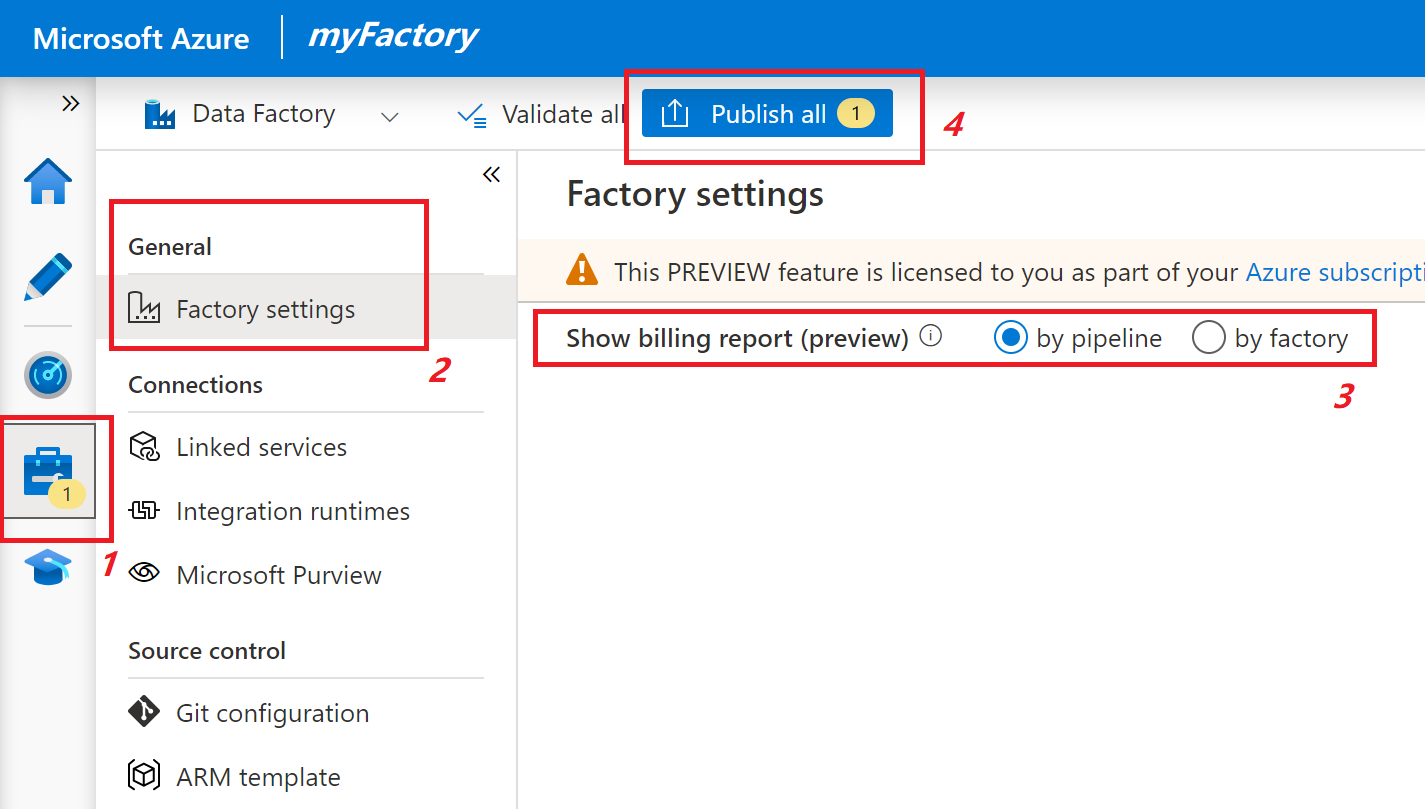
- Access the Azure Data Factory portal
- In the “Manage” tab, select “Factory settings” in the “General” section
- Select “Show billing report (preview)” under the “by pipeline” mode
- Publish the change
Limitations #
Below are the known limitations of the per-pipeline billing features. These billing meters will not be filed under the pipeline that spawns them, but rather under an alternative line item for your factory.
- Azure Data Factory operations charges, including read/write and monitoring
- Charges for Azure Data Factory SSIS (SQL Server Integration Services) nodes
- If you have Time to Live (TTL) configured for Azure Integration Runtime (Azure IR), Data Flow activities executed in these IRs will not be logged under individual pipelines.
Reference #
https://learn.microsoft.com/pt-br/azure/data-factory/plan-manage-costs


