Skip to content
Cloud8 Logo
  • PRODUCT
  • PRICING
  • SUPPORT
  • CONTACT US
  • LOGIN
  • PRODUCT
  • PRICING
  • SUPPORT
  • CONTACT US
  • LOGIN

Avançado

  • Creation of unified annual budgets

Best Practices

  • How to integrate Slack into Best Practices
  • How to monitor memory and swap with SSM
  • AWS Bucket S3 Topic Notification
  • Best Practices: Password and Credential Monitoring
  • Best Practices: Custom Rule Notifications via AWS S3
  • Best Practices: Microsoft Teams Support

Charging

  • AWS account suspension: tips and what to do

Cloud8 Academy

  • Configuring Budgets on Cloud8
  • Best Practices for Using Tags (Playbook)

Concepts

  • Security groups
  • Access key
  • Cloud Computing
  • Cloud Control Panel – AWS, Azure, GCP, Huawei and Oracle
  • Cost model: pay per use
  • Additional disks
  • Snapshot
  • Cloud server image or template
  • Comparison: Automation via Cloud8 vs “homemade” automation
  • FINOPS: Data Integration and Enhancement Flow (Infographic)
  • Difference between RI Applied vs RI in Cloud8 Panel

Credentials

  • How to use IAM Role to integrate your security with Cloud8
  • Security credentials for public clouds
  • Connecting OCI Providers to Cloud8 – Full Tutorial
  • Credential for Huawei Cloud
  • Best Practices: Enabling user monitoring in Azure

Features

  • Monitoring the creation of new resources in Cloud8
  • Cost analysis dashboards
  • Creating and managing Cost Management Exports
  • Configuring GCP SSO and SAML
  • Backup with “Lock/Unlock” governance
  • Cost Analysis with FinOps Analytics
  • Tracking Consumption Patterns with Invoice – Annual from Cloud8
  • How to integrate and export data from Cloud8 to Cloud Storages
  • Monitoring the creation of new resources in Cloud8
  • Configuring GCP SSO and SAML
  • Using Cloud Pricing on Cloud8

First Steps

  • Connecting GCP Providers to Cloud8 – Full tutorial
  • Connecting AWS Providers to Cloud8 – Full Tutorial
  • How to manage more than one AWS account
  • Hot to enable cloud cost estimates monitoring
  • Connecting Azure Enterprise Agreement providers to Cloud8 – Full tutorial
  • Creating a New Account on Amazon Cloud (AWS)
  • Connecting OCI Providers to Cloud8 – Full Tutorial
  • Cloud8 Users and Profiles
  • Onboarding: getting started on Cloud8

MSP / Reseller

  • White label at no additional cost
  • MSP: Configuring costs
  • MSP: Configuring markup

Primeiros Passos

  • Security credentials for public clouds
  • Connecting Azure providers to Cloud8 – Complete tutorial
  • Connecting MongoDB providers in Cloud8

Services

  • FinOps: Tags and Usage
  • Using Cloud8 Insights
  • Audit logs
  • Cloud usage statistics
  • Managers on Cloud8 – Resource management on AWS, Azure and GCP
  • Alerts
  • Using Automations in Cloud8
  • Multiple Users – Multiuser Panel
  • Cloud aggregator control panel
  • Automated backup of cloud servers
  • Cloud cost control, alerts and reports
  • ECS / Fargate support on Workflow
  • Detailed Costs Report
  • Enabling Azure AD SSO in the Cloud8 Dashboard
  • Workflow: How to reset tasks periodically
  • Add TAGs with CSV file
  • How to install Metricbeat component on AKS
  • RDS reports with grouping by ID
  • Kubernetes Cost Support
  • How to install Metricbeat component on GKE clusters
  • Enabling MFA in the Cloud8 Dashboard
  • FinOps: Cost Anomaly Reports and Charts
  • How to install the Metricbeat component in OKE
  • How to install Metricbeat component on EKS
  • FinOps: Reverse API
  • FinOps: Tag Sharing and Prorating
  • FinOps: Tag Sanitization, Compliance and MultiCloud
  • FinOps: Tagged / Untagged
  • FinOps: Tags / Labels / Resource Groups
  • FinOps: Reports, Alerts and Budgets
  • S3 Lambda Notification Processor (deploy via CLI)

Troubleshooting

  • I subscribed Amazon and I still can’t access Cloud8
  • How is the cloud cost estimate calculated?
  • I created a security group through the AWS console and it still doesn’t appear in Cloud8
  • I exported the cloud server usage report. What do the fields mean?
  • Cloud8 and Amazon don’t monitor my cloud server’s memory?

Tutoriais / FAQ

  • FAQ – Enable cost monitoring per pipeline in Data Factory
  • FAQ – How to test the SSO configuration?
  • Creation of unified annual budgets
  • Backup, DR, and Vault Copy with KMS

Tutorials

  • How to access a Windows server in the Amazon AWS cloud
  • How to access a Linux server
  • How to create a cloud server
  • How to integrate Slack into Best Practices
  • How to configure scheduling for script execution in AWS
  • How to configure scheduling by Tags / Labels
  • Configure vault copy at AWS (cross account) with KMS
  • How to configure the Scheduler for script execution on OCI
  • Workflow: How to reset tasks periodically
  • How to install Metricbeat component on AKS
  • How to install Metricbeat component on GKE clusters
  • How to install Metricbeat component on EKS
  • How to install the Metricbeat component in OKE
  • FinOps: Cost Anomaly Reports and Charts
  • Group data in Pivot Table
  • FinOps: Tag Sanitization, Compliance and MultiCloud
  • S3 Lambda Notification Processor (deploy via CLI)
  • Best Practices: Microsoft Teams Support
View Categories
  • Home
  • Docs
  • Avançado

Creation of unified annual budgets

2 min read

Creating annual budgets greatly facilitates the financial management of any company, offering medium and long-term visibility into projected expenses and thus enabling cost planning within the period. When it comes to cloud computing infrastructure costs, service providers currently offer features for this purpose, organizing one of the largest technology expenses for certain types of business.

However, when companies use hybrid and distributed multicloud environments based on more than one provider company, this process can become inefficient, given the differences between platforms and technologies, resulting in an ever-growing number of rules to be created and managed.

The Cloud8 Platform allows users to simplify enterprise budget management by grouping multiple providers into a single view, gathering simply and directly all the data needed to build the budget, regardless of the provider used. Check out how to do it below.

Step 1 – Accessing Cloud8 Budget Management #

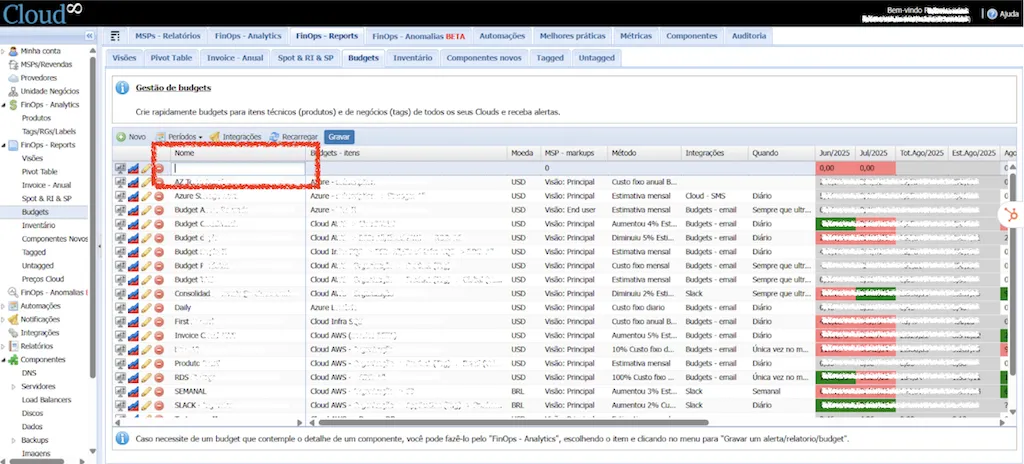
In the left sidebar menu, select FinOps Reports, and then Budgets. Click New, and a blank budget template will be created for editing. Each field represented by a column needs to be selected and filled out.

Step 2 – Configuring the Budget #

Name #

The name to be given to the Budget. A good practice to adopt is to give names that make the function of the budget it represents very clear, along with the configured providers, business units, and defined grouping method (Tags, Invoice, or Product).
Budgets – Items #

Configuration of the providers assigned to the budget. When clicking the field, all registered providers will be displayed.
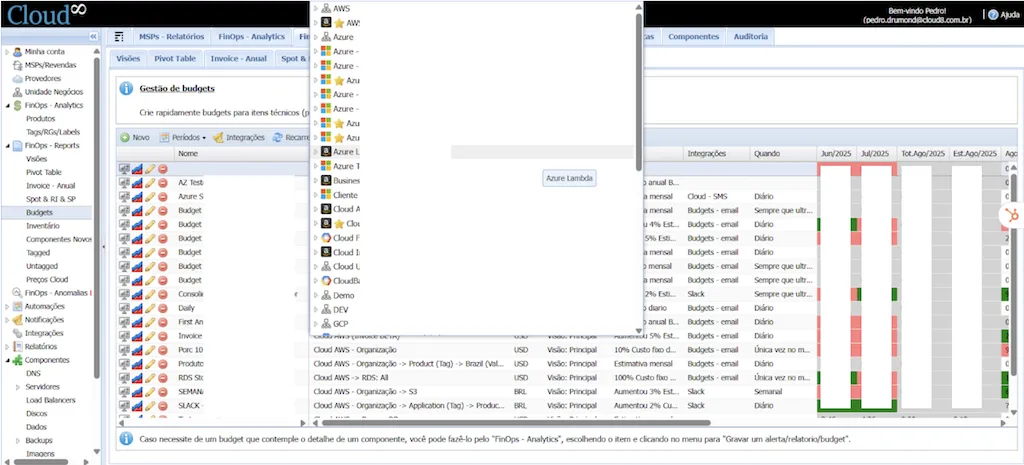
There are currently 3 (three) Budget formats implemented in the Cloud8 tool:

  • Organization – Invoice
  • Organization – Products
  • Organization – Tags

Organization – Invoice (BETA) – This budget configuration monitors the budget through the Invoice generated by the providers. In scenarios where business units, applications, and products are properly separated by Billing Profile (Azure), Billing Account (AWS), Payer Account (GCP and Huawei).

Organization – Products (Technical) – This budget configuration monitors the budget through service categories offered by the provider. You can specify which products you want to monitor within the defined budget, which is recommended for scenarios such as new implementations and products (e.g., A PoC for using Artificial Intelligence resources, where you can set a budget to prevent costs from exceeding reasonable values).

Organization – Tags (Business) – This budget configuration monitors the budget through metadata and their respective values, allowing greater control of budgets at the business level.

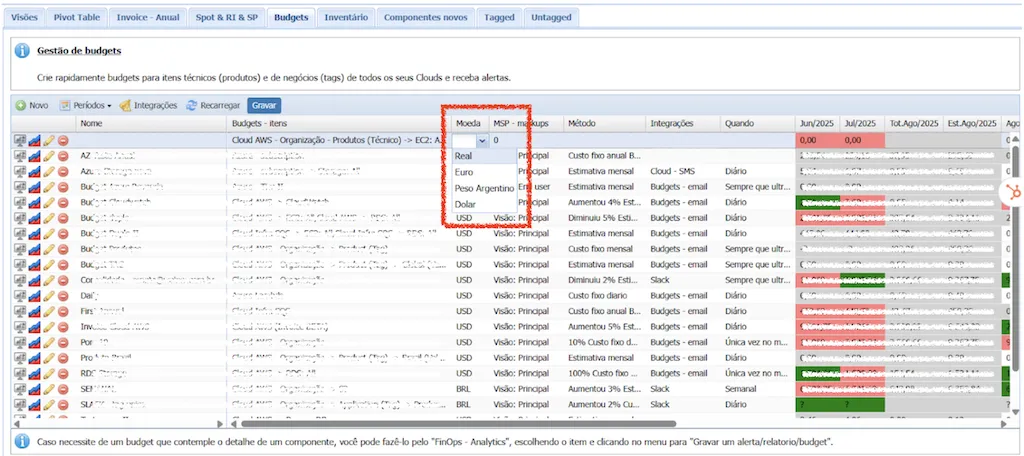
Currency #

Define the currency to be considered when triggering alerts, directly impacting scenarios where the provider bills in a specific currency (such as AWS, which bills in USD), or contracts that do not have a fixed exchange rate.
Method #

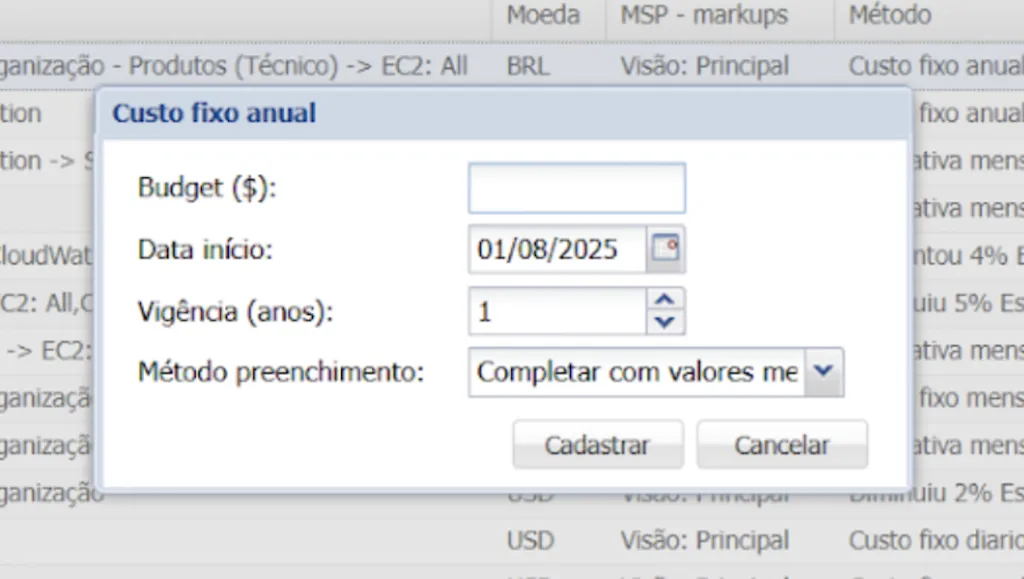
The Cloud8 tool has several trigger methods to monitor budget overruns. For annual budgets, select Fixed annual cost BETA. Then, fill in the Budget with the total cost of the period, budget start date, duration in years, and filling method, which can be:

  1. Fill with consumed monthly values and divide remainder: for scenarios where monthly costs may vary, but the budget for the entire period is defined, and the project scope must be adjusted to the remaining balance.
  2. Proportional – divide by the number of months: for scenarios where there is a defined average cost, and monthly variations allow the identification of consumption anomalies and insights into cost and environment growth.

Integrations #

When configuring a budget, it is possible to integrate with a messaging system or email triggering for those responsible for managing the budget.

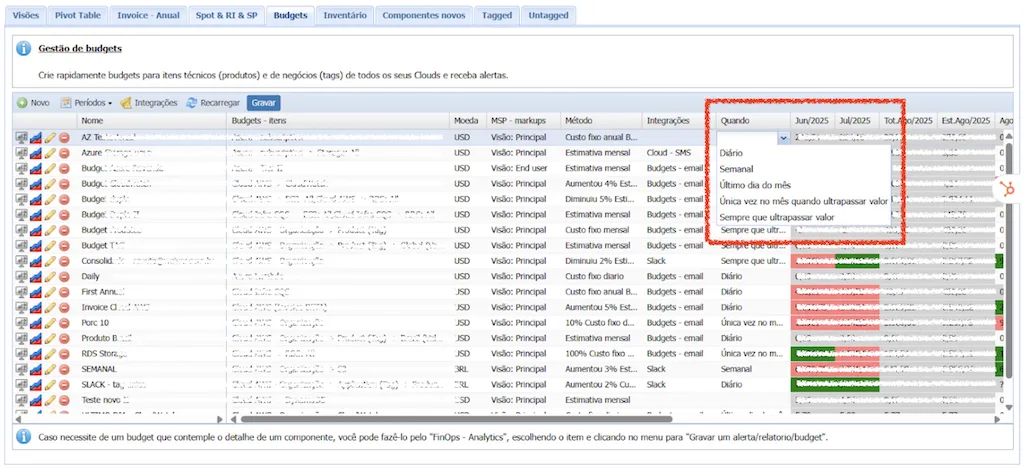
When #

Defines the granularity with which alerts are triggered.

  • Daily
  • Weekly
  • Last day of the month
  • Once a month when the value is exceeded
  • Whenever the value is exceeded

Step 3 – Saving Changes #

Upon completing the configuration of all fields, remember to click Save, or all settings will be lost. 

Final Considerations #

Budgets must be configured individually for each provider. If you want to create a Budget that encompasses more than one provider, you need to create a Business Unit.

budget, Finops, Relatórios
Did this Doc help you?

Share This Article:

  • Facebook
  • X
  • LinkedIn
  • Pinterest
Table of Contents
  • Step 1 - Accessing Cloud8 Budget Management
  • Step 2 - Configuring the Budget
    • Name
    • Budgets - Items
    • Currency
    • Method
    • Integrations
    • When
  • Step 3 - Saving Changes
  • Final Considerations
Cloud8 Logo
  • Terms of Use
  • About Us
  • FAQ / Support
  • Blog
  • Contact Us
  • Cookies (EU)
  • Terms of Use
  • About Us
  • FAQ / Support
  • Blog
  • Contact Us
  • Cookies (EU)
Globe-americas Facebook Twitter Linkedin Youtube

Disclaimer: AWS, images, and associated services are property of Amazon Web Services Inc. and its affiliates. Azure, images, and associated services are property of Microsoft Corporation. GCP, images, and associated services are property of Google Inc. Huawei, images, and associated services are property of Huawei Technologies Co Ltd. Oracle, images, and associated services are property of Oracle Corporation. Cloud8 Brasil em Português.

Manoel Netto Designer
Manage Consent
To provide the best experiences, we use technologies like cookies to store and/or access device information. Consenting to these technologies will allow us to process data such as browsing behavior or unique IDs on this site. Not consenting or withdrawing consent, may adversely affect certain features and functions.
Functional Always active
The technical storage or access is strictly necessary for the legitimate purpose of enabling the use of a specific service explicitly requested by the subscriber or user, or for the sole purpose of carrying out the transmission of a communication over an electronic communications network.
Preferences
The technical storage or access is necessary for the legitimate purpose of storing preferences that are not requested by the subscriber or user.
Statistics
The technical storage or access that is used exclusively for statistical purposes. The technical storage or access that is used exclusively for anonymous statistical purposes. Without a subpoena, voluntary compliance on the part of your Internet Service Provider, or additional records from a third party, information stored or retrieved for this purpose alone cannot usually be used to identify you.
Marketing
The technical storage or access is required to create user profiles to send advertising, or to track the user on a website or across several websites for similar marketing purposes.
  • Manage options
  • Manage services
  • Manage {vendor_count} vendors
  • Read more about these purposes
View preferences
  • {title}
  • {title}
  • {title}