Skip to content
Cloud8 Logo
  • PRODUCT
  • PRICING
  • SUPPORT
  • CONTACT US
  • LOGIN
  • PRODUCT
  • PRICING
  • SUPPORT
  • CONTACT US
  • LOGIN

Avançado

  • Creation of unified annual budgets

Best Practices

  • How to integrate Slack into Best Practices
  • How to monitor memory and swap with SSM
  • AWS Bucket S3 Topic Notification
  • Best Practices: Password and Credential Monitoring
  • Best Practices: Custom Rule Notifications via AWS S3
  • Best Practices: Microsoft Teams Support

Charging

  • AWS account suspension: tips and what to do

Cloud8 Academy

  • Configuring Budgets on Cloud8
  • Best Practices for Using Tags (Playbook)

Concepts

  • Security groups
  • Access key
  • Cloud Computing
  • Cloud Control Panel – AWS, Azure, GCP, Huawei and Oracle
  • Cost model: pay per use
  • Additional disks
  • Snapshot
  • Cloud server image or template
  • Comparison: Automation via Cloud8 vs “homemade” automation
  • FINOPS: Data Integration and Enhancement Flow (Infographic)
  • Difference between RI Applied vs RI in Cloud8 Panel

Credentials

  • How to use IAM Role to integrate your security with Cloud8
  • Security credentials for public clouds
  • Connecting OCI Providers to Cloud8 – Full Tutorial
  • Credential for Huawei Cloud
  • Best Practices: Enabling user monitoring in Azure

Features

  • Monitoring the creation of new resources in Cloud8
  • Cost analysis dashboards
  • Creating and managing Cost Management Exports
  • Configuring GCP SSO and SAML
  • Backup with “Lock/Unlock” governance
  • Cost Analysis with FinOps Analytics
  • Tracking Consumption Patterns with Invoice – Annual from Cloud8
  • How to integrate and export data from Cloud8 to Cloud Storages
  • Monitoring the creation of new resources in Cloud8
  • Configuring GCP SSO and SAML
  • Using Cloud Pricing on Cloud8

First Steps

  • Connecting GCP Providers to Cloud8 – Full tutorial
  • Connecting AWS Providers to Cloud8 – Full Tutorial
  • How to manage more than one AWS account
  • Hot to enable cloud cost estimates monitoring
  • Connecting Azure Enterprise Agreement providers to Cloud8 – Full tutorial
  • Creating a New Account on Amazon Cloud (AWS)
  • Connecting OCI Providers to Cloud8 – Full Tutorial
  • Cloud8 Users and Profiles
  • Onboarding: getting started on Cloud8

MSP / Reseller

  • White label at no additional cost
  • MSP: Configuring costs
  • MSP: Configuring markup

Primeiros Passos

  • Security credentials for public clouds
  • Connecting Azure providers to Cloud8 – Complete tutorial
  • Connecting MongoDB providers in Cloud8

Services

  • FinOps: Tags and Usage
  • Using Cloud8 Insights
  • Audit logs
  • Cloud usage statistics
  • Managers on Cloud8 – Resource management on AWS, Azure and GCP
  • Alerts
  • Using Automations in Cloud8
  • Multiple Users – Multiuser Panel
  • Cloud aggregator control panel
  • Automated backup of cloud servers
  • Cloud cost control, alerts and reports
  • ECS / Fargate support on Workflow
  • Detailed Costs Report
  • Enabling Azure AD SSO in the Cloud8 Dashboard
  • Workflow: How to reset tasks periodically
  • Add TAGs with CSV file
  • How to install Metricbeat component on AKS
  • RDS reports with grouping by ID
  • Kubernetes Cost Support
  • How to install Metricbeat component on GKE clusters
  • Enabling MFA in the Cloud8 Dashboard
  • FinOps: Cost Anomaly Reports and Charts
  • How to install the Metricbeat component in OKE
  • How to install Metricbeat component on EKS
  • FinOps: Reverse API
  • FinOps: Tag Sharing and Prorating
  • FinOps: Tag Sanitization, Compliance and MultiCloud
  • FinOps: Tagged / Untagged
  • FinOps: Tags / Labels / Resource Groups
  • FinOps: Reports, Alerts and Budgets
  • S3 Lambda Notification Processor (deploy via CLI)

Troubleshooting

  • I subscribed Amazon and I still can’t access Cloud8
  • How is the cloud cost estimate calculated?
  • I created a security group through the AWS console and it still doesn’t appear in Cloud8
  • I exported the cloud server usage report. What do the fields mean?
  • Cloud8 and Amazon don’t monitor my cloud server’s memory?

Tutoriais / FAQ

  • FAQ – Enable cost monitoring per pipeline in Data Factory
  • FAQ – How to test the SSO configuration?
  • Creation of unified annual budgets
  • Backup, DR, and Vault Copy with KMS

Tutorials

  • How to access a Windows server in the Amazon AWS cloud
  • How to access a Linux server
  • How to create a cloud server
  • How to integrate Slack into Best Practices
  • How to configure scheduling for script execution in AWS
  • How to configure scheduling by Tags / Labels
  • Configure vault copy at AWS (cross account) with KMS
  • How to configure the Scheduler for script execution on OCI
  • Workflow: How to reset tasks periodically
  • How to install Metricbeat component on AKS
  • How to install Metricbeat component on GKE clusters
  • How to install Metricbeat component on EKS
  • How to install the Metricbeat component in OKE
  • FinOps: Cost Anomaly Reports and Charts
  • Group data in Pivot Table
  • FinOps: Tag Sanitization, Compliance and MultiCloud
  • S3 Lambda Notification Processor (deploy via CLI)
  • Best Practices: Microsoft Teams Support
View Categories
  • Home
  • Docs

Configuring Notifications in Cloud8

5 min read

Cloud8 features a central Notifications module that allows you to configure, per cloud provider, which events and reports should trigger automated alerts via email or integrations (such as Slack, Teams, or webhooks). The settings are organized into six categories: Costs, Savings Plans/RIs, Infrastructure – Servers, Infrastructure – Databases, Synchronization, and Security. This article describes each of these categories and the available fields within them.

In the left sidebar menu, click on Notifications.

Selecting the Provider #

All notification settings are managed per cloud provider (AWS, Azure, GCP, or OCI, according to the providers registered in the customer’s environment). The Provider field at the top of the screen is mandatory and defines which account/environment the rules below will apply to. When switching the selected provider, the settings displayed in each tab are reloaded according to the chosen provider.

Costs Tab #

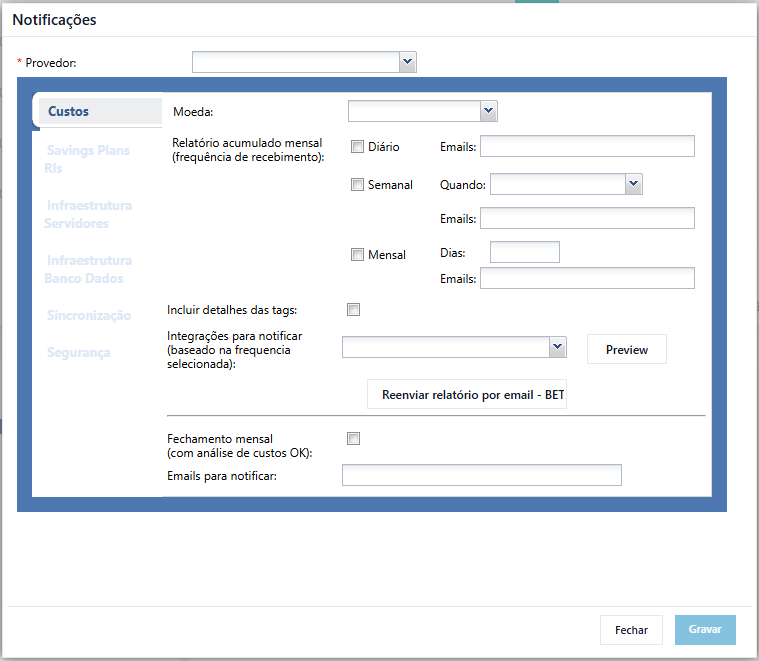
The Costs tab concentrates notifications related to cloud spending reports.

  • Currency: defines the currency used for the values displayed in the cost reports sent via email.
  • Monthly accumulated report (receiving frequency): allows you to choose one or more sending frequencies for the accumulated cost report:
    • Daily — sends the report every day to the specified email list.
    • Weekly — sends the report on a specific day of the week, selected in the When field, to the specified email list.
    • Monthly — sends the report on one or more days of the month, entered in the Days field, to the specified email list.
  • Include tag details: when checked, adds resource tags to the report.
  • Integrations to notify (based on selected frequency): allows you to select additional channels (e.g., Slack/Teams) to receive the same report configured above. The Preview button displays a preview of the report before sending.
  • Resend report by email: manually triggers the resending of the last generated cost report without waiting for the next scheduled execution.
  • Monthly closing (with OK cost analysis): when checked, sends a monthly closing notification informing that the period’s cost analysis has been completed, to the emails entered in the Emails to notify field.
Savings Plans / RIs Tab #

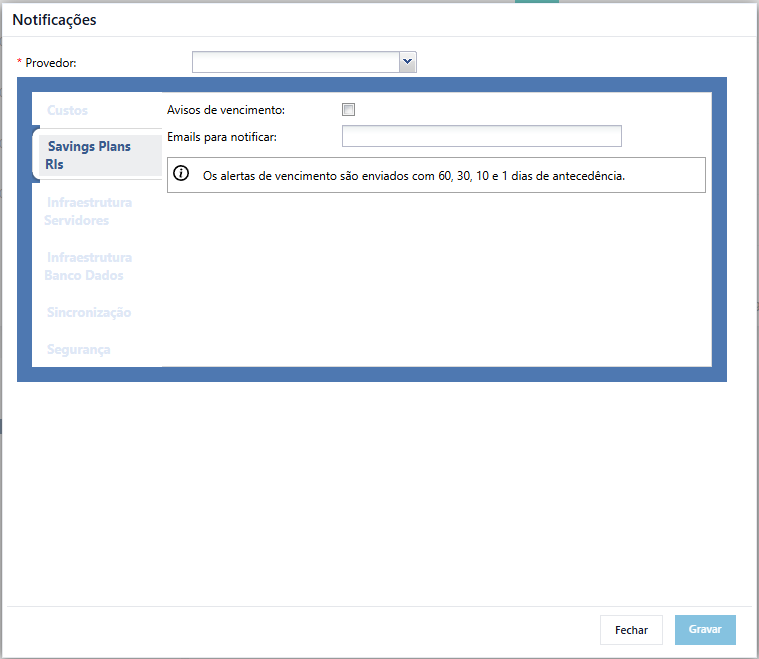
This tab controls expiration alerts for Savings Plans and Reserved Instances (RIs).

  • Expiration warnings: when checked, enables sending alerts as RI/Savings Plan commitments approach expiration.
  • Emails to notify: list of recipients who will receive the warnings.

Expiration alerts are sent automatically 60, 30, 10, and 1 day prior to the expiration date of each Savings Plan or Reserved Instance, as indicated on the screen itself.
Infrastructure – Servers Tab #

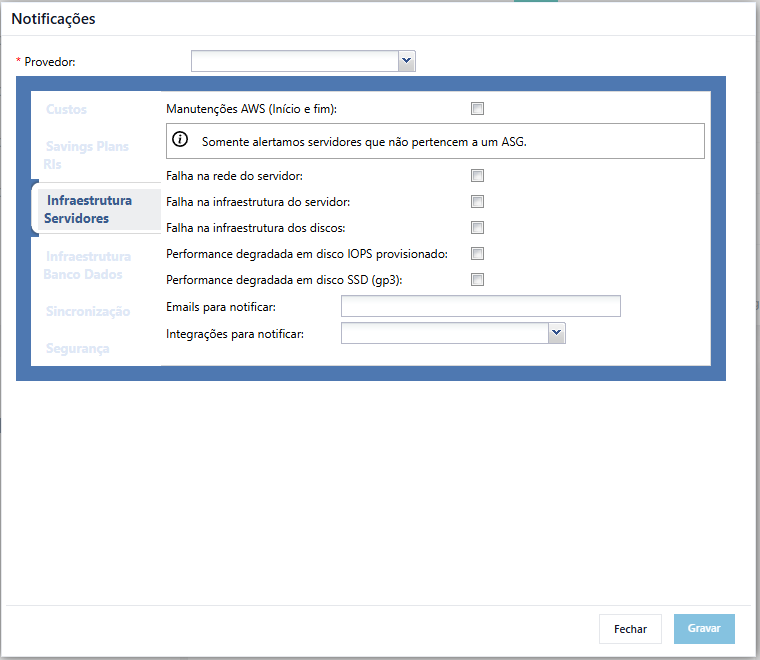
Gathers alerts related to the health and lifecycle of servers (compute instances).

  • AWS Maintenances (start and end): notifies about maintenance windows scheduled by AWS. Only servers that do not belong to an Auto Scaling Group (ASG) trigger these alerts.
  • Server network failure: alerts in case of server network downtime.
  • Server infrastructure failure: alerts in case of underlying server hardware/infrastructure failure.
  • Disk infrastructure failure: alerts in case of storage infrastructure failure associated with the server.
  • Degraded performance on provisioned IOPS disk: alerts when a disk with provisioned IOPS shows performance degradation.
  • Degraded performance on SSD disk (gp3): alerts when a gp3-type SSD disk shows performance degradation.
  • Emails to notify and Integrations to notify: email recipients and/or integration channels that should receive the above alerts.
Infrastructure – Databases Tab #

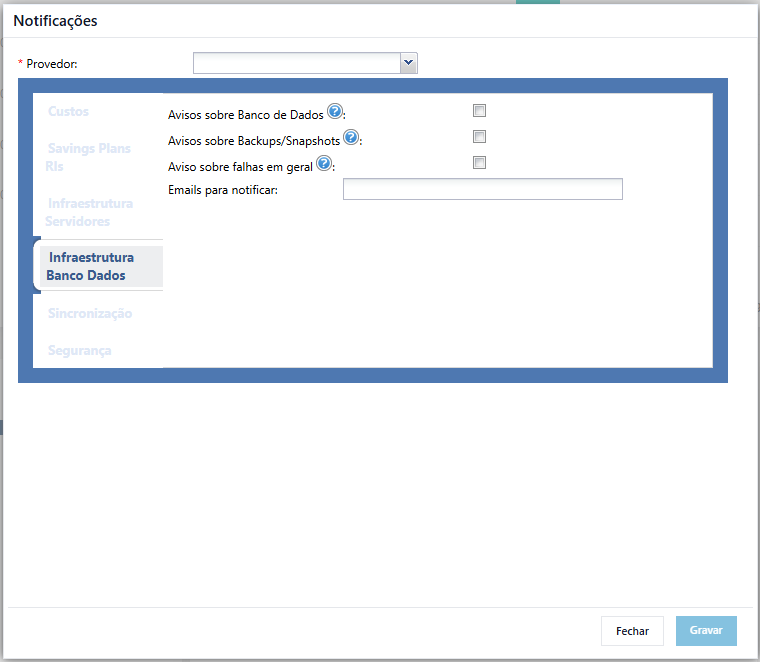
Focuses on alerts specific to managed database instances.

  • Database warnings: notifies about relevant database events, including:
    • Creation
    • Destruction
    • Configuration changes
    • Upgrades
    • Endpoint changes
    • Reboot
  • Backup/Snapshot warnings: notifies about the execution (success or failure) of database backups and snapshots.
  • General failure warnings: notifies about general failures not covered by the previous items.
  • Emails to notify: list of recipients for this tab’s alerts.
Synchronization Tab #

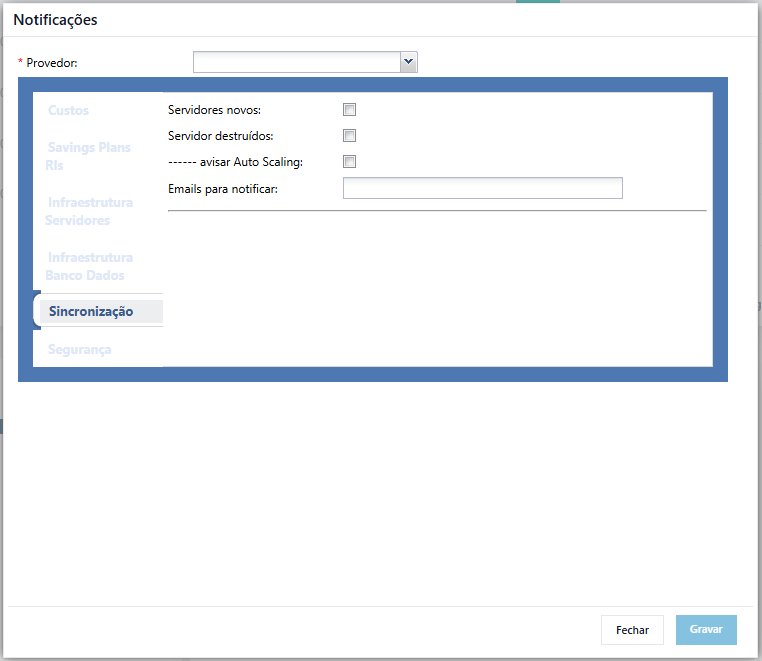
Handles alerts related to the creation and removal of resources identified during environment synchronization.

  • New servers: notifies when a new server is identified in the environment.
  • Destroyed servers: notifies when a previously existing server is removed/destroyed.
  • Notify Auto Scaling: notifies about Auto Scaling events (joining/leaving instances managed by an Auto Scaling Group).
  • Emails to notify: list of recipients for this tab’s alerts.
Security Tab #

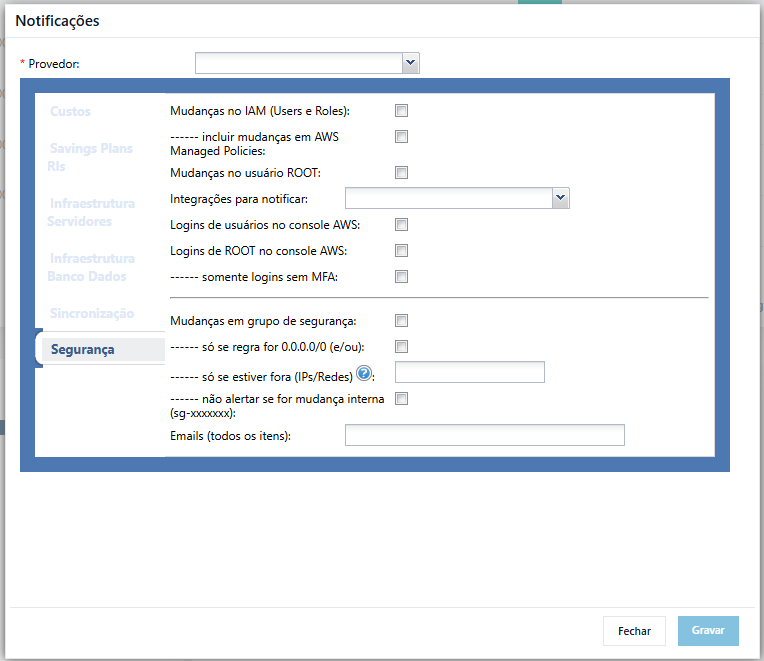
Gathers alerts focused on cloud account governance and security.

  • IAM changes (Users and Roles): notifies about the creation, modification, or removal of IAM users and roles.
    • Include AWS Managed Policies changes — extends the above alert to also cover changes to AWS-managed policies.
  • ROOT user changes: notifies about any changes made to the account’s root user.
  • Integrations to notify: additional channels (besides email) to receive security alerts.
  • AWS console user logins: notifies on every user login made to the AWS console.
  • ROOT logins in AWS console: specifically notifies logins made with the root user.
    • Only logins without MFA — restricts root (and/or user) login alerts exclusively to accesses made without multi-factor authentication.
  • Security group changes: notifies about changes to security groups. This alert can be refined with the following filters:
    • Only if the rule is 0.0.0.0/0 (and/or) — restricts the alert to changes involving rules open to the entire internet.
    • Only if outside of (IPs/Networks) — restricts the alert to changes whose IPs/networks are outside the list provided as trusted.
    • Do not alert if internal change (sg-xxxxxxx) — allows excluding changes originating from a specific internal security group from the alert.
  • Emails (all items): single list of recipients for all security alerts configured in this tab.
Saving Settings #

After configuring the desired tabs for the selected provider, click on Save to save changes. The Close button discards the screen without applying pending changes. It is recommended to review the email lists entered in each tab before saving to ensure that the correct recipients receive each type of alert.


You may want to check these Docs too: #

  • Credential for Huawei Cloud
  • Enabling Azure AD SSO in the Cloud8 Dashboard
  • Security credentials for public clouds
  • Connecting Azure providers to Cloud8 – Complete tutorial
  • How to export Best Practices recommendations
Did this Doc help you?

Share This Article:

  • Facebook
  • X
  • LinkedIn
  • Pinterest
Table of Contents
  • Selecting the Provider
  • Costs Tab
  • Savings Plans / RIs Tab
  • Infrastructure – Servers Tab
  • Infrastructure – Databases Tab
  • Synchronization Tab
  • Security Tab
  • Saving Settings
Cloud8 Logo
  • Terms of Use
  • About Us
  • FAQ / Support
  • Blog
  • Contact Us
  • Cookies (EU)
  • Terms of Use
  • About Us
  • FAQ / Support
  • Blog
  • Contact Us
  • Cookies (EU)
Globe-americas Facebook Twitter Linkedin Youtube

Disclaimer: AWS, images, and associated services are property of Amazon Web Services Inc. and its affiliates. Azure, images, and associated services are property of Microsoft Corporation. GCP, images, and associated services are property of Google Inc. Huawei, images, and associated services are property of Huawei Technologies Co Ltd. Oracle, images, and associated services are property of Oracle Corporation. Cloud8 Brasil em Português.

Manoel Netto Designer
Manage Consent
To provide the best experiences, we use technologies like cookies to store and/or access device information. Consenting to these technologies will allow us to process data such as browsing behavior or unique IDs on this site. Not consenting or withdrawing consent, may adversely affect certain features and functions.
Functional Always active
The technical storage or access is strictly necessary for the legitimate purpose of enabling the use of a specific service explicitly requested by the subscriber or user, or for the sole purpose of carrying out the transmission of a communication over an electronic communications network.
Preferences
The technical storage or access is necessary for the legitimate purpose of storing preferences that are not requested by the subscriber or user.
Statistics
The technical storage or access that is used exclusively for statistical purposes. The technical storage or access that is used exclusively for anonymous statistical purposes. Without a subpoena, voluntary compliance on the part of your Internet Service Provider, or additional records from a third party, information stored or retrieved for this purpose alone cannot usually be used to identify you.
Marketing
The technical storage or access is required to create user profiles to send advertising, or to track the user on a website or across several websites for similar marketing purposes.
  • Manage options
  • Manage services
  • Manage {vendor_count} vendors
  • Read more about these purposes
View preferences
  • {title}
  • {title}
  • {title}